
As the industry grapples with AI, the conversation around its use is shifting—from fear and rejection to a more pragmatic focus on how to adopt the technology ethically, sustainably and legally. In some cases, AI is increasingly viewed as less of a creative threat and more of a business necessity, as producers face growing pressure from buyers to deliver projects faster and at a lower cost.
To lift the curtain on this often confusing and overwhelming software market, Kidscreen presents its first-ever AI tool guide. Rather than attempting to catalogue everything available, this resource focuses on the products producers say they’re actually using, highlighting tools that help save time, reduce costs and streamline workflows.
We also asked production experts to weigh in on where these tools deliver real value, which parts of the production process they make easier, what long-standing challenges they can help solve, and how they stack up in a fast-growing field of competitors.
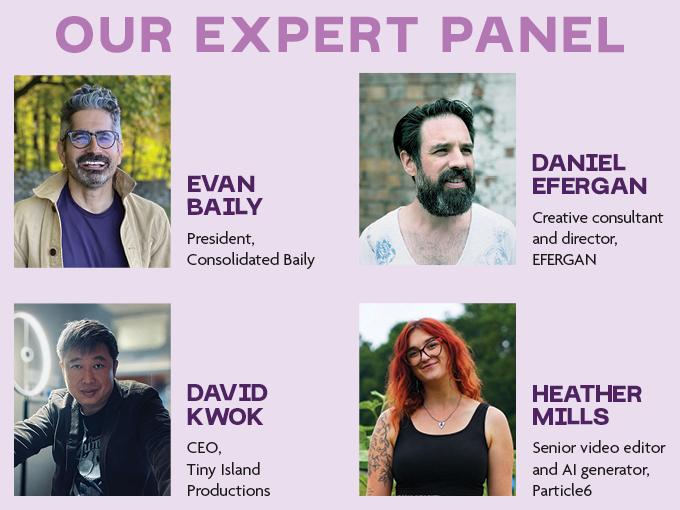
For this story, we consulted Evan Baily, president of Consolidated Baily; Daniel Efergan, creative consultant and director, EFERGAN; David Kwok, CEO of Tiny Island Productions; and Heather Mills, senior video editor and AI generator at Particle6.
Writing, Storyboarding & Script Analysis
So far, AI products that focus on supporting the writing and storyboarding process are really analysis tools that look at scripts and do the time-consuming work of counting shots, characters and VFX. The key point here is that these tools aren’t doing the writing for you, but giving you an early sense of red flags (like a huge cast of characters or a ton of VFX shots in one episode) so you can plan ahead and make choices before animation has started and changes become more costly.
ChatGPT
Company: OpenAI
What it does: This mainstream chatbot can respond to user prompts with text and images, and it also has a voice mode that can create speech. Since 2022, the industry has been using it to do everything from brainstorming ideas and writing emails, to research and even creating art. Some folks Kidscreen spoke to said they even use it as a creative sparring partner to get feedback on scripts. At its best, it’s a tool that can help with ideation and bouncing ideas around during the story development phase.
Pricing: There’s a free option, plus paid tiers ranging from US$20 to US$200 per month that include early access to new features.
Why it stands out: “It is very useful to break down your story into shots,” says David Kwok, CEO of Tiny Island Productions. “I never use it for generating images because it’s quite slow.” Particle6 Productions’ senior video editor and AI generator. Heather Mills adds: “This tool is great at understanding nuanced dialogue and tone in scripts. If there’s something not quite right in a specific scene, you can use the Canvas interface (a split-screen editor) to highlight parts of the dialogue, and then prompt the tool to create specific tonal and emotional shifts. We’d use ChatGPT at a more micro level to improve rhythm of dialogue and emotional beats within a single scene, rather than a whole script.”
Deep Seek
Company: High-Flyer
What it does: Like ChatGPT, this Chinese large-language model can help brainstorm ideas for story development, answer questions and analyze data. For writers and producers, it can examine a screenplay and provide information—including detailed descriptions of shot types and camera angles, which can be fed into image and video generation tools.
Pricing: There’s a free tier and a pay-as-you-go model for its API.
Why it stands out: “Besides ChatGPT, DeepSeek is a great assistant,” says Kwok. “For story, I normally use ChatGPT and DeepSeek. What we really need now is to give [DeepSeek] a story, let it break it down into shots for you, and then use it to generate videos.”
Gemini
Company: Google
What it does: Billed as a creative partner for the pre-production phase, Gemini analyzes a script’s pacing and dialogue in seconds, as well as breaking down a shot list and highlighting scenes that might be ambitious for an indie budget. It’s also a potentially powerful tool for storyboarding, since it can generate images and also act as a director by critiquing composition, lighting and focal length, and noting how a shot fits into a script’s narrative flow.
Pricing: There’s a free tier that lets you upload up to 50 pages a month, an Advanced tier for US$20 per month (up to 1,500 pages) and an Enterprise level (up to 3,000 pages) that starts at US$20 per user per month.
Why it stands out: “This tool excels at big-picture analysis of an entire script,” says Mills. “Since Gemini is a Google-based company, and therefore connected to Google Search, it can also check facts across the whole script in real time. And when prompted, it can identify pacing, story beats and character arcs throughout the whole script—essentially giving you a summary of the story. A great use case for both [Gemini and ChatGPT] is uploading a section of a script and the corresponding section of storyboard, and then asking if the tone and emotion in the script are reflected in the cinematography displayed in the storyboard. You could then prompt either tool to generate alternative shots that reflect the script better.”
Scriptsee
Company: Motion Tech Lab
What it does: This AI-powered pre-production platform helps writing and production teams more effectively plan out their stories before storyboarding begins or cameras start rolling. It can analyze TV and film scripts in minutes to break down the number of characters, locations, props and effects that will be required. It can also analyze story arc and emotional flow by examining the script’s language. Scriptsee uses 27 AI models combining natural language processing and large-language models to identify and label different parts of a script. It can analyze a 30-minute TV script in under two minutes, and a feature-length script in seven.
Pricing: There’s a pay-as-you-go tier that costs US$125 per script, or a monthly subscription for studios at US$600.
Why it stands out: “This tool uses AI to break down scripts into data and identify emotional arcs in the story, at the same time highlighting production risks like budgeting and scheduling,” says Mills.
Scriptsense
Company: The Cinelytic Group
What it does: ScriptSense can generate script coverage reports that include a logline, subgenres the project fits into, similar titles and a breakdown of characters. There’s also a chatbot that provides answers to questions like how many locations are in the script and whether there are any stunts, making it easy for producers to keep track of what a script requires. It can also offer suggestions for simplifying a story to cut down on costly elements—flagging if there are numerous set designs, costumes and props, for example.
Pricing: A pro tier is available for US$99 a month for one user, providing five script coverage reports monthly. There’s also a free tier that delivers one script report a month, and an enterprise tier for unlimited users.
Why it stands out: “It’s very impressive,” says Evan Baily, president of Consolidated Baily. “I haven’t used it for a long time, but the last time I did, it not only gave very smart notes on a screenplay, but also feedback on buyers and other equity investors that might be interested, [notes on] how to simplify to cut the budget, [and] casting suggestions, including an awareness of the social following of various actors that might make the project more attractive to financiers in specific territories.”
Image Generation
A key part of the development process is creating mood boards, playing around with character designs, and generating art that can describe the tone of a project. These tools can save time and effort by automating the mechanical work of manually editing a piece of art, removing elements from it, or extending its background.

David Kwok created this VFX test with Dreamina and animated it using Luma, to see if AI could produce massive VFX shots like those in Hollywood movies
Dreamina
Company: ByteDance
What it does: Dreamina’s multiple capabilities include image and video generation, text to image, editing and up-scaling. Creators can also make avatars that realistically lip-sync, plus generate AI-composed music that the program matches to the content and pacing of the video. ByteDance has integrated Dreamina into its AI-powered video editor CapCut, so consumers don’t have to jump between tools.
Pricing: Tiers range from free to US$84 per month.
Why it stands out: “Dreamina will probably continue to be one of the key AI-generated content players in the market,” says Kwok. “Its image and video generation are getting stronger and stronger. It is slowly developing the full set of AI tools for production, [and] it has several breakthrough AI developments for animation.”
Firefly
Company: Adobe
What it does: An AI image, video and mood board generator, Firefly has several features for quickly creating and editing art, including an image editor that can change backgrounds, colors and objects in existing images. To make sure the tool is commercially safe, Firefly’s first model was trained on licensed images from Adobe Stock and public domain content for which copyrights had expired. Beyond generating images and videos, it can also layer on a soundtrack, voiceovers and narration to videos.
Pricing: There’s a free limited version, and paid plans range from US$10 to more than US$150 per month, including unlimited access to video generation.
Why it stands out: “I used to use it quite a bit, as the result is realistic, but the quality is losing out to the rest,” says Kwok. Adds creative consultant and director Daniel Efergan: “Adobe is working hard to discover how AI generation might fit into the industry’s creative practice. Its approach to working with a licensed dataset is the right one (although it still comes with certain legal and ethical complications), but in my experience, its Firefly models don’t perform as well as others out there.”
Flux
Company: Black Forest Labs
What it does: Flux can generate new images and edit existing ones based on user prompts. Unlike most image-generation tools, it lets users use both images and text to prompt the model to do anything from simple clean-up to making significant changes, like adding snow to a picture. Black Forest offers several image generation models and APIs based on its Flux model.
Pricing: Flux’s API pricing ranges from US$0.04 to US$0.25 per image.
Why it stands out: “One of Flux.2’s secret superpowers is its ability to up-res images,” says Baily. “Try it if you’ve been iterating extensively on an image in Nano Banana, because image quality tends to deteriorate across multiple iterations, and Nano Banana struggles to restore sharpness and detail, even if you give it reference images for the sharpness and detail you’re trying to reconstruct.” Adds Kwok: “Flux used to be the best tool to generate realistic humans, but it is costly. Now there are more and more tools catching up, and at a lower cost.”
Higgsfield
Company: Higgsfield
What it does: It’s an image and video generator that can also edit videos and create selfies in different styles based on existing photos—useful for creating social media profiles for fictional characters. Higgsfield claims to stand apart from other tools because it gives creators a lot of control over camera movements. Users can generate shots that simulate advanced filming techniques like overhead shots and dolly moves.
Pricing: Tiers range from US$8 to US$75 per month.
Why it stands out: “A tool used for both image and video generations, it gives us the opportunity to test out multiple AI models in one program, so we can easily compare results and choose the model that is best suited to the project in terms of style,” says Mills. And Kwok notes: “For fancy camera moves, this is really good.”
Kling
Company: Kuaiashou
What it does: This Chinese AI tool can create complex motion and animations, change the background of existing footage, and handle various camera movements. It can also fix poorly generated lip-syncs.
Pricing: Plans range from US$120 to more than US$2,000 per year (paid monthly or annually), including access to image and video models and priority features.
Why it stands out: “It understands the prompt for animation way better than most tools,” says Kwok. And Mills adds: “This is game-changing in AI terms because character/object consistency is an issue that crops up all the time on most AI video generators. The motion on both 2.6 and O1 is also now pretty fluid, with more understanding for realism, depth and complex human movements.”
Midjourney
Company: Midjourney
What it does: Midjourney is a text-to-image generator with the capability to create detailed images from simple prompts and upscale its outputs. Users can also upload images, and Midjourney will customize the art (color palette, atmosphere, etc.) to the look of a specific character. Plus there’s a bot available through the social media app Discord that users can prompt, and a model specifically for creating anime-style art. A major caveat: Disney, Universal Pictures and WBD have filed copyright infringement lawsuits against Midjourney, alleging that its models were trained on stolen art.
Pricing: Plans range from US$10 to US$120 per month, including features like unlimited video and image generations.
Why it stands out: “This tool excels at creating cinematic photographs with minimal prompting,” says Mills. “From a single prompt, it offers four options with subtle differences, so you can choose the tone and style of the image easily.” However, Kwok notes: “This [was] the best image-gen tool initially, [with] good aesthetic sense. But due to cost and other tools catching up, I stopped using it.”

Particle6, the company that created the AI actress Tilly Norwood, used Seedream and Nano Bana Pro (with Higgsfield as the tool provider) to create historical locations for the 10-episode series Streets of the Past, which premiered on The History Channel in the Netherlands last month
Nano Banana
Company: Google
What it does: Built on the foundation of Google’s Gemini 3 technology, this tool has powerful capabilities for creating and editing images. It also connects to Google Search, so it can easily take an input like the image of a plant and provide information on its care and growth. It can also create storyboards from a single image, complete with potential types of shots and camera movement—all handy uses for producers who are strapped for time and money.
Pricing: Plans range from US$12 per month for individuals, to US$80 a year for studios.
Why it stands out: “It can do remarkably consistent reconstructions of characters and scenes from new camera angles—great when you’re planning a scene,” says Baily. “And the ability to work with it iteratively in a Gemini chat is very helpful.” Kwok adds: “This is a breakthrough for fixing shots, and the Pro is even better. But Dreamina has the same ability. Whatever Nano can’t fix, I will use Dreamina for.”
Stable Diffusion
Company: Stability AI
What it does: This text-to-image and image-to-image generator can make photorealistic art. Launched in 2022, Stable Diffusion has had time to simplify its process, so the tool is easier to use. It has some capabilities for creating videos or motion from still images, and there are lots of tutorials and support to help those who are new to using it.
Pricing: There’s a free tier, plus paid plans ranging from US$20 to US$40 per month.
Why it stands out: “Together with ComfyUI, this is a superb tool, especially for those who want control,” says Efergan. “Security usage is good, as it’s run locally. However, you probably need powerful hardware to run it. And whoever uses it must be tech-savvy. Stable Diffusion’s suite of models have been deeply embedded in the open-source community for a long time now (at least in ‘AI time,’ which feels similar to dog years). As such, the support, community and iterations that have developed around these models are immense.”
VEO 3.1
Company: Google DeepMind
What it does: Veo creates short videos in a variety of animation styles—boasting more realistic animation, better adherence to prompts and improved visual quality when it comes to turning images into videos. Creators can put two images in, and Veo will generate a video that blends them together. It can also handle shadows and lighting for a more natural look. On the way is the ability to cut out any details and have the AI reconstruct the background and surroundings so the image still looks realistic.
Pricing: It’s accessible through a Google AI subscription, with plans ranging from US$26.99 to US$339.99 per month, depending on storage.
Why it stands out: “This is a pretty good tool for animation,” says Kwok. “But it is too expensive for beginners who are just learning it.”
Video Generation
Video generation tools can solve some familiar challenges in this part of the process, including giving producers a cheaper and faster way to create teasers or show off the tone and feel they’re looking for in later non-AI versions. Many broadcasters and studios have (or are developing) rules governing the use of AI in pitch materials and productions. And while some are taking a more selective approach and using it just in the early parts of the process, others are going all out and doing the bulk of the work with these tools.
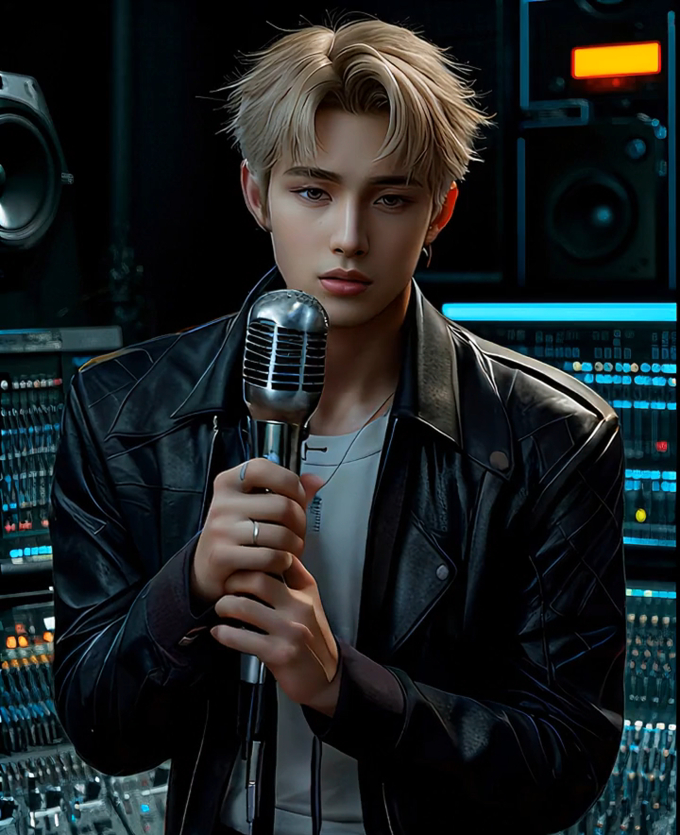
Using Dreamina, Kwok generated this virtual K-pop star, then created TikTok videos in which the character sings and dances realistically
ComfyUI
Company: Comfy Org
What it does: For users who want to combine AI models and operations together, ComfyUI is a free open-source software that lets users build AI-powered workflows. A ComfyUI workflow can generate any type of media, including images, video, audio and AI agent.
Pricing: The basic plan costs US$20 per month, with an enterprise option available.
Why it stands out: “ComfyUI is the bedrock of many people’s AI-driven workflows, and I would suggest that right now, most serious pipelines will be using ComfyUI at some point,” says Efergan. However, it comes with complexity because “unlike a tool such as Runway or Veo, you tend to deal with the guts of the process—which is powerful when it works, but when it doesn’t, it can send you into a spiral of unfathomable errors.”
Grok Image
Company: xAI
What it does: Text-to-image generation, text-to-video and image and video editing are among Grok Imagine’s features. It has different models, including a fun one that delivers more dynamic camera movements and comedic animation. And it’s fast, according to David Kwok.
Pricing: Plans range from US$30 to US$50 per month, with an agency tier priced at US$200 per month.
Why it stands out: “When you submit an image to it, the image is animated with a prompt within seconds—it’s almost real-time,” says Kwok. “You can adjust the animation accordingly with the prompt to see how it reacts, and it is very useful for quick results. It has both a normal and a fun mode, and the latter is especially useful for character animation.”
Marey
Company: Moonvalley
What it does: Marey is a video generator that can transform 2D scenes into 3D environments so animators can direct the camera as if they were on a live-action set. Plus, the tool can pull motion from a reference video—such as water falling or lightning striking—and apply it to new subjects or scenes to create realistic physics. It can also extend videos and add effects, while preserving a scene’s original look and motion, which could cut down on the time and cost of having to reshoot footage. Users can simply drag objects into the video to move elements, instead of entering prompts. This tool aims to be a mix of production-grade outputs built on a model that’s trained only on licensed, high-res footage.
Pricing: Users can generate 1080p videos using AI trained on fully licensed data, with plans ranging from US$14.99 to US$149.99 per month. Enterprise pricing is also available.
Why it stands out: “Moonvalley’s Marey is an attractive proposition: A video-based foundational model trained solely on licensed content,” says Efergan. “Its creative outlet (Asteria) is producing some of the most progressive integrations of AI into its practice, and this approach can be seen in Marey’s features and workflow, as it has the potential to be extremely useful to filmmakers and animators. This opportunity is sometimes let down by the quality of the model’s outputs, although this is changing all the time.”
Runway Gen-4.5
Company: Runway AI
What it does: Introduced on December 1, Runway Gen-4.5 boasts that it creates cinematic and highly realistic videos. Users can make complex scenes with multiple elements, life-like physics (something AI models tend to struggle with) and facial detail. It also creates stylized, expressive motion in animation. In one case study, producers of the live-action series House of David for Amazon used Runway to create photorealistic visuals in a VFX-heavy scene in just a few weeks, compared to the four or five months it would have taken by more traditional means.
Pricing: There’s a free tier, with paid plans ranging from US$12 to US$76 per month, plus an enterprise tier with custom pricing.
Why it stands out: “[Runway Gen-4.5 is] one of the most advanced and recent video generation tools,” says Mills. “It promises to deliver superior physics simulation, fine-grained temporal control, and high-fidelity motion that rivals actual footage.” Kwok notes: “This is a very good tool. The only challenge is the cost for beginners.”
Audio & Music
Whether it’s putting an AI-generated voice over a script or storyboard to quickly check a script’s pacing and timing, or making a rough music track to level up an animatic right before a presentation, the following tools aim to make the critical audio stage easier for producers.
ElevenLabs
Company: ElevenLabs
What it does: This voice AI platform offers services such as text-to-speech, AI agents for customer service, voice cloning and dubbing in more than 20 languages. It can also create music and make voice clones. The company is building a library in which producers can license, with permission, virtual replications of famous voices. Matthew McConaughey and Michael Caine have already signed up to lend their voices to it. Imagine the opportunity for productions of any size to “cast” famous actors without having to work around their schedules or pay typical movie star rates.
Pricing: There’s a free tier, along with paid monthly plans ranging from US$1 to more than US$1,000 for businesses.
Why it stands out: “This tool is used for generating realistic-sounding voices for which you can adjust the speed, tone and variation of speech,” says Mills. “It can produce voices with realistic and emotive intonation that perfectly replicates human speech.”
Suno
Sparking success
Toonboom’s Ember brings three tools together to automate production
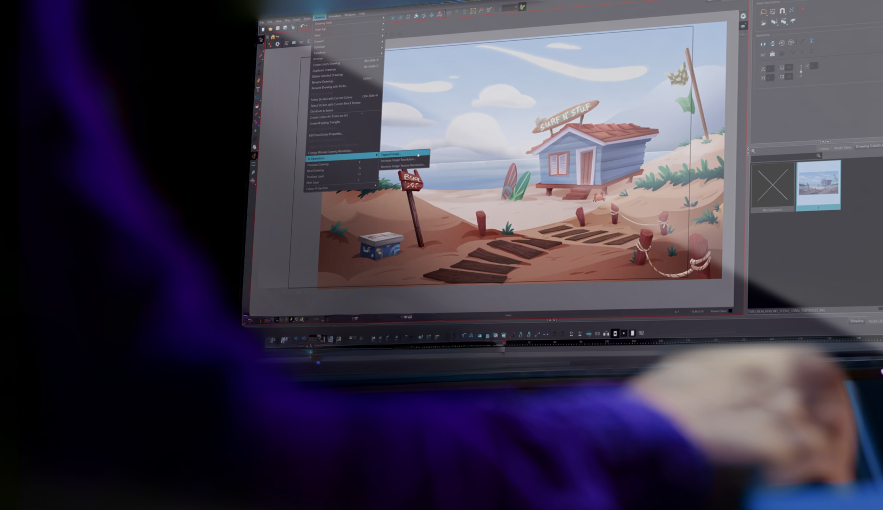
Seeing demand from producers needing to be faster and save money, Canadian animation software company Toon Boom has been building an AI-powered suite of tools called Ember to streamline production and automate repetitive tasks. Its features are also available as optional add-ons to the company’s Storyboard Pro and Harmony (animation software) products, creating a more integrated experience. Most AI tools on the market handle one or two production tasks (although this is starting to change), and building Ember is Toon Boom’s answer for studios that can’t afford to spend the time—or money—researching and testing several different tools to determine which one works best for each production need.
By and large, producers are also looking for an efficient, end-to-end pipeline so they don’t have to jump from tool to tool, says Toon Boom CEO Colin Bohm.
Ember combines software from three different vendors into one pipeline to make some key parts of the animation process easier. The tech uses Bria AI for image manipulation, ElevenLabs for creating rough voice tracks using AI voices, and Google Gemini for script analysis. Toon Boom picked these software providers specifically because their tools respect copyright, which is of paramount concern to artists, says Bohm.
On the script side, Ember can check how many scenes are in a script, what camera movements there are, and any potential props that appear—helping storyboard artists work up boards without spending hours manually breaking down a scene. AI can handle this work in minutes, says CTO Francisco Del Cueto.
This tool also saves time in storyboarding. To check how long an episode is and how much time the dialogue takes up, artists would traditionally have to record themselves saying all of the dialogue. But Ember can automate this by creating a first pass of rough audio tracks. This isn’t meant to be the final product, but it saves time for the artist, especially since boards for TV sometimes have to be made very quickly, adds Del Cueto.
Ember doesn’t have prompt-to-image capabilities, but it can upscale an image, expand an existing image’s background or erase elements that artists don’t want—all uses that could potentially shave hours of time from an artist’s schedule.
This tech is expected to save studios between 5% and 10% of both time and budget compared with producing with traditional tools, says Bohm. And those savings can be expected to increase slightly if the storyboards are particularly complex and would take more time for humans to break down.
Toon Boom is committed to developing Ember further, with plans to invest over the next 18 to 36 months, adds Bohm. One key update in the works will let AI clone an artist’s voice from a small sample, so the artist can have their voice over the board reading at the speed they want.
Also on the way is a library of sound effects that will identify the sounds needed in an analyzed script and provide them to artists. This will save them from having to hunt down the sound effects in a library outside of their pipeline. There’s also a tool for animation in-betweening in the works, which will erase the need for other tools that require a lot of prompting and clean-up work to get right.
The industry is seeing a shift in how animation is produced in real time, and AI is creating opportunities for producers to change how different parts of a production pipeline work, adds Bohm.
Toon Boom is having more and more conversations with its clients about AI becoming a necessity. And while adoption is happening at different pacing, it’s certainly happening, so the company wants to be ready. “If this is a nine-inning game, we’re only in the first.”
The top image is from David Kwok, who used Midjourney to create it for a project he’s working on for the Apple Vision Pro that’s in the same vein as Ready Player One.
This story originally appeared in Kidscreeen‘s Q1 2026 magazine issue.



















 Newsletter